Free Forever WhatsApp Web API for Developers
WireWeb helps developers send, receive, and automate WhatsApp messages using a simple WhatsApp Web-based API. Connect your session, create an API key, and start building in minutes.
Connect a WhatsApp Web session, copy your API key, and test core workflows without a paid plan.
Trusted to integrate with
 Zapier
 Make
Make n8n
n8n HubSpot
 Shopify
 Python SDK
What is actually free?
Searchers use "free WhatsApp API" to mean several different things. WireWeb's free forever developer access covers WhatsApp Web-based workflows: connect a session, send test and operational messages through REST, and receive events through webhooks. Official Cloud API testing and production business messaging follow Meta's own platform rules.
| Route | What can be free | What can cost money | Best fit |
|---|---|---|---|
| WireWeb free forever access | REST API access, one connected session, webhook support, and quick-start testing. | Advanced team features, multi-number workflows, priority support, and campaign tools. | Developers, internal tools, CRM alerts, n8n/Zapier flows, and fast prototypes. |
| Official WhatsApp Cloud API | Development assets such as test numbers and sandbox-style testing. | Production business messaging usage, business setup, and provider/support layers. | Policy-sensitive, regulated, large-scale, or official business messaging. |
| Self-hosted Web wrappers | Open-source code and local hosting if you manage the infrastructure yourself. | Server cost, maintenance, updates, monitoring, and support time. | Builders who want maximum control and accept more operational responsibility. |
| Hosted trials | Short trials or limited free usage depending on the provider. | Ongoing plan fees after the trial or usage limits. | Teams that want hosted convenience and are comfortable with a paid plan later. |
Important: WireWeb is a developer tool for WhatsApp Web-based workflows. It is not the official WhatsApp Cloud API and is not affiliated with WhatsApp or Meta.
WhatsApp Web API vs official Cloud API
The right choice depends on whether you need the official Meta business platform or a fast linked-session workflow for developer automation.
| Decision factor | Official WhatsApp Cloud API | WhatsApp Web-based API layer | Best fit |
|---|---|---|---|
| Trust and support | Highest: official Meta infrastructure and policy framework. | Lower: provider or self-hosted support, not official Meta infrastructure. | Use Cloud API for regulated or business-critical messaging. |
| Setup model | Meta app, business assets, phone number, tokens, webhooks, and policy setup. | Linked-device or QR-style session setup, then REST requests and webhooks. | Use Web-based workflows for rapid prototypes and internal automation. |
| Pricing model | Testing can be free; production business usage follows Meta pricing and rules. | Tool-dependent: free forever access, self-hosted core, hosted plan, or paid tier. | Compare total cost across usage, support, hosting, and maintenance. |
| Risk profile | Lowest from a platform-policy point of view. | Higher because unofficial apps and Web-based layers are not WhatsApp-supported. | Be explicit about trade-offs before choosing a route. |
Live in under 60 seconds. Fast linked-session setup.
WireWeb uses a WhatsApp Web-based session model for fast developer setup. If you need official Meta infrastructure, business verification, or policy-sensitive scale, compare your use case with the official Cloud API before choosing.
Open the WireWeb dashboard
Visit app.wireweb.co.in. No account creation needed to start. A unique QR code is generated instantly for your session.
Scan the QR with WhatsApp
Open WhatsApp on your phone → Linked Devices → Link a device. Scan the QR displayed on the dashboard. Your number is now connected.
Get your API key & start sending
Copy your unique API key. Make your first HTTP request to send a WhatsApp message from any language, framework, or automation tool.
Everything a developer
WhatsApp Web API needs
Send and receive messages, handle media, subscribe to webhook events, and route work through sessions without waiting on a long setup path.
Send & Receive Messages
Send text, images, documents, audio, and video. Receive incoming messages via webhooks in real-time. Full two-way messaging out of the box.
Real-time Webhooks
Configure a webhook URL and get instant POST notifications for every incoming message, delivery receipt, and status update.
Rich Media Support
Send images, PDFs, voice notes, stickers, locations, and contact cards. WireWeb supports every media type WhatsApp allows.
Multi-Number Sessions
Connect multiple WhatsApp numbers under a single account. Perfect for agencies, teams, and businesses managing multiple client lines.
REST API & SDK
Clean, versioned REST API with SDKs for Node.js, Python, PHP, and Go. Comprehensive documentation with copy-paste code examples.
Message limits by plan
Free includes up to 100 outgoing messages per day. Pro includes unlimited messages, subject to fair use and WhatsApp account behavior.
14k+
Active developers
60s
Average setup time
₹0
Free forever access
2-way
Send and receive via webhooks
Connect to the tools
you already use
WireWeb works with every platform out of the box. If it can make an HTTP request, it can send WhatsApp messages through WireWeb.
HubSpot
Send WhatsApp notifications from CRM workflows, deal stage changes, and contact updates.
Python
pip install wireweb-python — official SDK with async support, type hints, and examples.

Node.js
npm install wireweb — Promise-based client, TypeScript types, zero dependencies.

REST API
Works with any language: PHP, Go, Ruby, Java, Rust — if it speaks HTTP, it works.
Clean API. 5-minute
integration.
Start with one API key, a connected session, and normal HTTP requests. The examples below show the two jobs most developers need first: send a message and verify a webhook endpoint.
# Send a WhatsApp message with WireWeb

curl -X POST "https://api.wireweb.co.in/v1/messages/send" \
  -H "Content-Type: application/json" \
  -H "X-API-Key: ww_live_your_api_key_here" \
  -d '{
    "session_id": "ww_sess_your_session_id_here",
    "to": "+919876543210",
    "type": "text",
    "message": "Hello from WireWeb!"
  }'

# Response
{
  "success": true,
  "message_id": "ww_msg_8f3k2x9p",
  "status": "queued",
  "timestamp": 1714387200
}
Send a message
curl -X POST "https://api.wireweb.co.in/v1/messages/send" \
  -H "Content-Type: application/json" \
  -H "X-API-Key: ww_live_your_api_key_here" \
  -d '{
    "session_id": "ww_sess_your_session_id_here",
    "to": "+919876543210",
    "type": "text",
    "message": "Hello from WireWeb"
  }'
Verify a webhook
import express from "express";

const app = express();

app.get("/webhook", (req, res) => {
  const mode = req.query["hub.mode"];
  const token = req.query["hub.verify_token"];
  const challenge = req.query["hub.challenge"];

  if (mode === "subscribe" && token === process.env.WEBHOOK_VERIFY_TOKEN) {
    return res.status(200).send(challenge);
  }

  return res.sendStatus(403);
});
Handle an event
app.use(express.json());

app.post("/webhook", (req, res) => {
  const event = req.body;

  console.log(event.message_id);
  console.log(event.from);
  console.log(event.text);

  res.sendStatus(200);
});Built for every kind of
business & builder
Whether you are a solo developer, store operator, or support team, WireWeb gives you a fast route to WhatsApp Web-based automation with clear trade-offs.
E-commerce & Shopify Stores
Automate the entire customer journey. From order confirmation to delivery tracking to post-purchase reviews — all on WhatsApp where your customers actually are.
- Instant order confirmation messages
- Real-time shipping status updates
- Abandoned cart recovery campaigns
- Review & feedback collection
Customer Support Teams
Connect your support helpdesk to WhatsApp. Let customers raise tickets, get status updates, and receive resolutions — all without leaving WhatsApp.
- Zendesk & Freshdesk integration
- Auto-reply for common queries
- Ticket status notifications
- Agent handoff with context
SaaS Products & Startups
Add WhatsApp notifications to your product in an afternoon. User signups, payment alerts, feature announcements — reach users where open rates are 98%.
- Transactional notification system
- OTP & 2FA over WhatsApp
- In-app alert forwarding
- Trial expiry & upsell messages
Marketing Agencies & Freelancers
Manage consent-based WhatsApp workflows for multiple clients under one WireWeb account. Keep operational updates, support replies, and campaign tools separated by number.
- Multi-number client management
- Consent-based audience workflows
- Campaign scheduling for compliant lists
- Per-client API key isolation
Simple, honest pricing.
Free forever.
Choose the same Free or Pro plan available in the WireWeb app. Prices below are shown in Indian rupees.
Free
₹0
Forever · No monthly fee
- ✓ 1 WhatsApp device
- ✓ 100 outgoing messages per day
- ✓ Ban protection not included
- ✓ Limited API usage and logs
- ✓ 1 webhook
- ✓ No priority support
Pro
₹499
Per month
- ✓ Multiple WhatsApp devices
- ✓ Unlimited messages · Fair use
- ✓ Ban protection included
- ✓ Full API access
- ✓ Full webhooks and extended API logs
- ✓ Priority support
Common questions,
honest answers
The clearest WhatsApp Web API guide
for developers in 2026
What is a WhatsApp API?
A WhatsApp API lets software send and receive WhatsApp messages through defined endpoints and events. WireWeb focuses on WhatsApp Web-based workflows where developers connect a session, send messages through REST, and receive events through webhooks.
Why compare with Meta's official API?
The official WhatsApp Cloud API is the supported route for business messaging, policy governance, and large-scale production workflows. WireWeb is useful when speed, developer setup, and linked-session automation matter more than official platform infrastructure.
Free forever access, clearly scoped
WireWeb's free forever access covers core REST and webhook workflows for one connected session. Paid upgrades are for advanced usage such as multi-number operations, analytics, team features, support, and campaign tooling.
WhatsApp API integration guide
Integrating WireWeb takes under 5 minutes. Visit the dashboard, scan the QR with your WhatsApp, copy your API key, and make a POST request to our /send endpoint with the recipient number and message. Full REST API documentation with code examples in 6 languages is available at docs.wireweb.co.in.
WhatsApp automation for businesses
Connect WireWeb to Zapier, Make, or n8n to create WhatsApp automation without building a custom backend. Trigger messages from form submissions, CRM updates, payment events, Shopify webhooks, or support events.
Operational visibility for WhatsApp workflows
WireWeb is designed around message IDs, queued states, webhook events, and retry-friendly payloads so teams can debug WhatsApp delivery paths without guessing what happened after a send request.
WhatsApp API for Shopify & e-commerce
Send WhatsApp order confirmations, shipping updates, COD reminders, and abandoned cart nudges directly from your store. WireWeb integrates with Shopify workflows via webhooks and automation tools, helping you reduce support tickets and increase repeat purchases with fast, trackable customer communication.
Webhooks, sessions & multi-number support
WireWeb supports incoming message webhooks, delivery status callbacks, and session-based authentication so you can run multiple WhatsApp numbers cleanly. Use a session ID to route messages per device, and manage multiple integrations without mixing traffic across numbers.
WireWeb vs. other WhatsApp API options
Use this matrix to decide whether you need a fast WhatsApp Web-based workflow, official Meta infrastructure, a CPaaS provider, or an inbox-first WhatsApp platform.
| Criteria | WireWeb | Meta Cloud API | Twilio WhatsApp | WATI-style inbox tools |
|---|---|---|---|---|
| Best fit | Fast developer setup, webhooks, CRMs, automation, internal tools | Official Meta infrastructure and template-led business messaging | Teams already using Twilio APIs across channels | Business teams that want inbox, approved-template campaigns, and low-code workflows |
| Setup path | Connect session, copy API key, send request | Business, app, phone, token, webhook, and template setup | Twilio account, sandbox or sender approval, API setup | Workspace onboarding and official API configuration |
| Webhook support | Incoming messages, delivery status, session events | Available through Meta webhook subscriptions | Incoming messages and delivery callbacks | Available through platform APIs and integrations |
| When to choose | You need speed, workflow flexibility, and developer-friendly automation | You need official Meta-only infrastructure and enterprise compliance | You need CPaaS flexibility across SMS, voice, and WhatsApp | You need a ready-made agent inbox more than a raw API |
Who WireWeb is for, and who should use Meta directly
Choose WireWeb if
You need a fast WhatsApp API for developers, CRM messaging, n8n/Zapier/Make automation, support workflows, order updates, or internal tools where setup speed matters.
Choose official Meta API if
You require official Meta-only infrastructure, template-heavy campaigns, formal enterprise procurement, verified business account workflows, or BSP-managed compliance support.
Use WireWeb responsibly
WireWeb is strongest for transactional, operational, and consent-based communication. Avoid spam, cold-list blasts, or any usage that violates WhatsApp policies.
Proof you can inspect before signing up
Review dashboard imagery, request and response examples, webhook payloads, and workflow-specific guides before connecting a session.
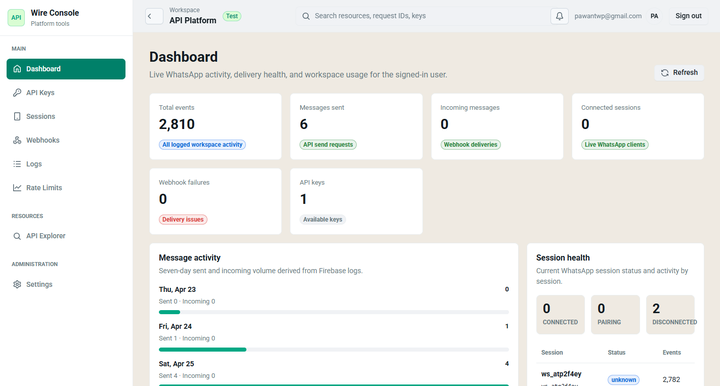
Dashboard preview
The homepage uses a real WireWeb dashboard preview so visitors can see the product context before clicking through.
API response example
{
  "success": true,
  "message_id": "ww_msg_8f3k2x9p",
  "status": "queued",
  "session_id": "ww_sess_123"
}
Your WhatsApp API
is one scan away
Start with a free developer workflow, then compare the trade-offs before using WhatsApp messaging in production.
14,000+ developers already building with WireWeb
Pages built for conversion intent
These pages target buyers searching for implementation-ready WhatsApp solutions instead of broad educational queries.
WhatsApp API for developers
For teams that need a developer-ready API, webhooks, and flexible backend integrations.
WhatsApp API with webhooks
For apps that need real-time inbound events, status callbacks, and automation triggers.
WhatsApp API for CRM
For sales, support, and lifecycle messaging tied directly to lead and customer records.
WhatsApp API for n8n
For operators building automated flows across forms, payments, CRM changes, and support events.
WhatsApp API for Zapier
For teams connecting forms, spreadsheets, CRMs, and payment tools to WhatsApp messages.
WhatsApp API for Shopify
For ecommerce stores sending order updates, COD reminders, shipping alerts, and review requests.
WhatsApp API for Make
For Make scenarios with routers, filters, webhooks, CRM updates, and ecommerce events.
WhatsApp Business API alternative
For buyers comparing setup speed, integration flexibility, and messaging workflow fit.