WhatsApp Web API Developer Guide
WireWeb gives developers a practical REST API for WhatsApp messaging with webhook events, session routing, media support, and workflow integrations for apps, CRMs, chatbots, and automation tools.
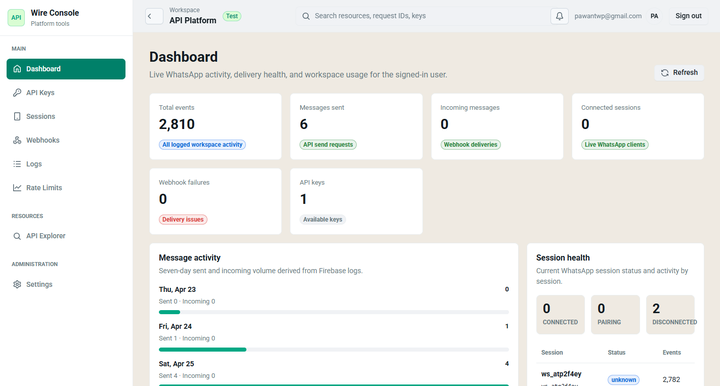
5-minute developer setup
This section targets builders searching for a developer-ready WhatsApp API. It gives them the setup path and the request shape before they sign up.
Implementation steps
- Create a WireWeb session from the dashboard.
- Scan the QR code with the WhatsApp number you want to connect.
- Copy your API key and session ID.
- Send your first message through the REST endpoint.
- Add a webhook URL to receive replies and delivery events.
Best fit
WireWeb is useful for internal tools, SaaS notifications, CRM follow-ups, ecommerce messaging, chatbot prototypes, agency workflows, and support systems that need fast WhatsApp integration.
Send a WhatsApp message with the REST API
Use these examples in backend jobs, queue workers, serverless functions, or automation tools that can make HTTP requests.
curl -X POST "https://api.wireweb.co.in/v1/messages/send" \
  -H "Content-Type: application/json" \
  -H "X-API-Key: ww_live_your_api_key" \
  -d '{
    "session_id": "ww_sess_123",
    "to": "+919876543210",
    "type": "text",
    "message": "Your order has shipped."
  }'
const response = await fetch(
"https://api.wireweb.co.in/v1/messages/send",
{
method: "POST",
headers: {
"Content-Type": "application/json",
"X-API-Key": process.env.WIREWEB_API_KEY
},
body: JSON.stringify({
session_id: "ww_sess_123",
to: "+919876543210",
type: "text",
message: "Your appointment is confirmed."
})
}
);import requests
payload = {
"session_id": "ww_sess_123",
"to": "+919876543210",
"type": "text",
"message": "Your payment reminder is due today."
}
requests.post(
"https://api.wireweb.co.in/v1/messages/send",
json=payload,
headers={"X-API-Key": WIREWEB_API_KEY},
timeout=20,
){
"success": true,
"message_id": "ww_msg_8f3k2x9p",
"status": "queued",
"session_id": "ww_sess_123",
"created_at": "2026-05-19T04:17:45Z"
}API surface developers expect
Outbound messaging
Send text, media, documents, and transactional updates from your backend or automation workflow.
Inbound webhooks
Receive incoming messages, delivery statuses, and session events at your webhook endpoint.
Session routing
Use session IDs to route messages through the correct connected WhatsApp number.
CRM workflows
Attach WhatsApp messages to lead records, support tickets, order timelines, or internal notes.
Automation tools
Trigger sends from n8n, Zapier, Make, Shopify webhooks, forms, or custom backend events.
Operational visibility
Use message IDs, queued states, webhook events, and retry logs to debug delivery paths.
Webhook payload example
Developers searching for a WhatsApp webhook API need to see the inbound shape before committing to an integration.
{
  "event": "message.received",
  "message_id": "ww_msg_in_91a72",
  "session_id": "ww_sess_123",
  "from": "+919876543210",
  "type": "text",
  "text": "Can you send the invoice?",
  "timestamp": "2026-05-19T04:17:45Z",
  "contact": {
    "name": "Customer",
    "wa_id": "919876543210"
  }
}
High-converting developer use cases
OTP-style alerts
Send login codes, account notices, and verification reminders through a fast backend endpoint.
Order notifications
Send order confirmations, dispatch alerts, COD reminders, and delivery updates from ecommerce events.
Lead follow-ups
Trigger WhatsApp follow-ups when a form, ad lead, or CRM record is created.
Support replies
Route inbound WhatsApp messages into an agent inbox, ticketing workflow, or chatbot handoff.
Appointment reminders
Notify patients, students, clients, or customers before scheduled meetings and calls.
Internal alerts
Push urgent ops, payment, lead, or incident alerts into WhatsApp from backend jobs.
FAQ for developers
Is WireWeb the official Meta WhatsApp Business API?
No. WireWeb uses a QR-linked session model for fast setup. If you need official Meta template infrastructure, enterprise compliance, or very high-volume broadcast operations, evaluate Meta Cloud API or a BSP as well.
Can I receive messages through webhooks?
Yes. Configure a webhook URL and use incoming message events to update your app, CRM, automation flow, or support tool.
Which languages work with WireWeb?
Any language that can make HTTPS requests works. The examples above show cURL, Node.js, and Python because those are common for backend and automation teams.
Start building with WireWeb
Connect a WhatsApp session, send a test message, then add webhooks when your workflow is ready.